Showing posts with label Calibre. Show all posts

Friday, February 22, 2013

Convert ePub to Mobi using Calibre

(This is the 6th part of my multi-part How To Publish An Ebook thang.)

If you have an e-reader or more than a couple ebooks, you should use Calibre to organize them. Calibre is like iTunes for ebooks. It is also free software.

Calibre enables you to download ebooks from your Kindle or Nook or iPad or whatever and then transfer them onto your computer's hard disk. When you have more than one ereader (or like me, one of each), Calibre is a good tool for putting an optimal mix of ebooks on each.

I don't approve of archiving all my ebooks on Amazon's or some other company's server. Instead, I believe I should have all the ebooks that I've purchased on my own hard disks and on backup medium. It stops Amazon from doing skeezy things like taking books away from you when they feel they must.

But that's not why I'm writing.

When you bring an ebook into Calibre it can convert it between different ebook formats. There are only two ebook formats you need to care about: MOBI and ePub (Sure there is LRF for Sony readers, and CLT for Microsoft readers, and PDF, and something else that's Apple-specific, but you really don't need more than those two ebook formats.) When you sell for the iPad, Kobo, Sony, or Nook, you provide ePub format files. And when you sell for the Kindle you provide MOBI format files.

The workflow that I follow, and that I recommend goes like this:

DOCX => HTML =>  ePub => MOBI

You use Microsoft Word to create DOCX files, then Rick Boatright's web page to convert to HTML, then use Sigil to build ePub (and make everything perfect), then use Calibre to convert to MOBI.

If, like Finding Time, your ebook has a lot of images/illustrations in it, you may need to compress the MOBI file to reduce the "delivery charges" that Amazon levies against large-sized ebooks. To compress a MOBI, just take the MOBI file and convert it a 2nd time to MOBI to make the compression happen.

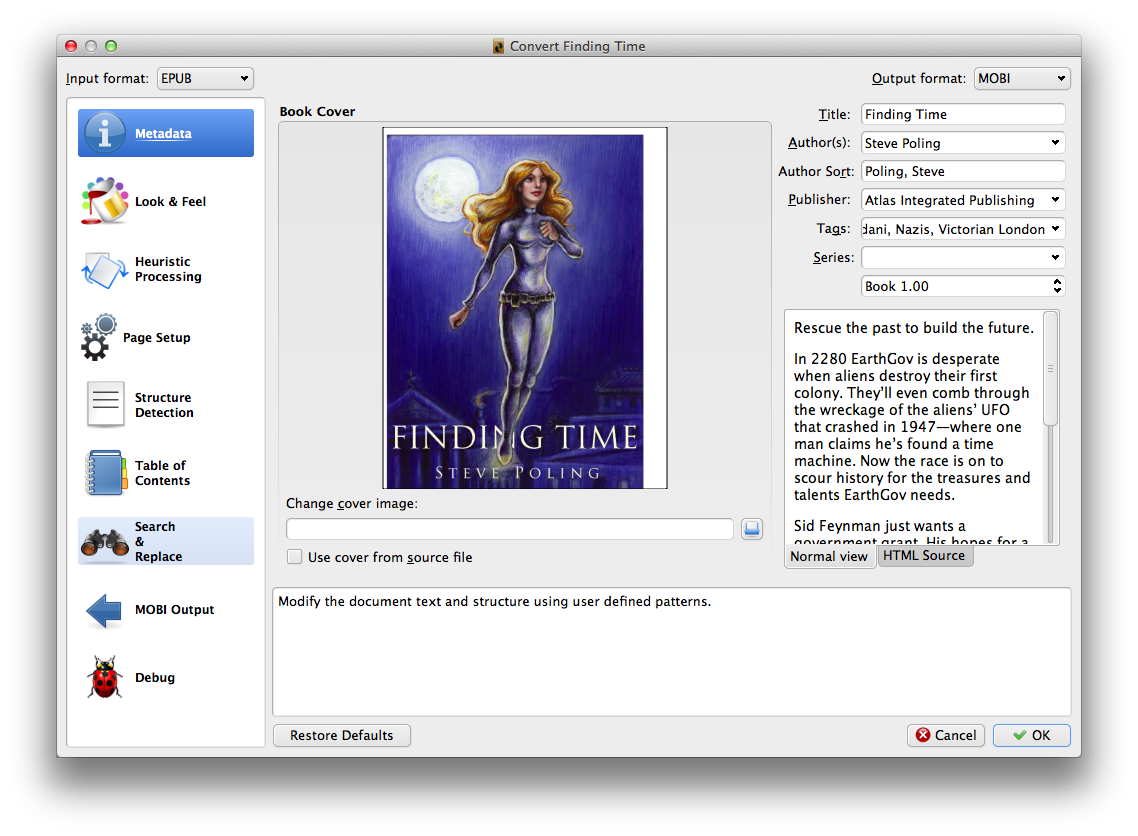
Converting between ePub and MOBI formats is pitifully easy. Just go into Calibre.
  • Load your ePub file (from Sigil) into Calibre by clicking on the "Add Book(s)" button
  • Right click on the book and select "Convert Books"/"Convert Individually" from the popuup
  • On the upper left hand corner, verify that it says ePub
  • On the upper right hand corner, verify that it says MOBI
  • If not, change the buttons in the corner accordingly
  • Verify the metadata on the file is as you want (it should have been set up in Sigil)
  • Click the OK button
Play around with the dialog and acquaint yourself with all the controls. If there's anything you don't recognize or don't know, you might want to consult the Calibre documentation.

This isn't rocket surgery, the guys at Calibre have done all the work for you, and the program is free!

One more word on workflow. I suggest you be prepared to run this process multiple times. The logical place to fix typos is in DOCX files. And then you'll have to redo everything downstream from there. The more you can automate of that downstream processing, the less painful typos will be.

And typos are one of the key indicators of amateurism in self-published ebooks. Be prepared to test the dickens out of your ebooks. Many eyes make shallow bugs. You want the maximum number of eyes on your books before publication.
(You can find the bullet-point outline of How To Publish An Ebook here.)

Thursday, February 21, 2013

Reverse Engineering ePubs

When you publish an ebook, you should study what others have done. There are some serious adults out there who can do some marvelous things in ebook design. And when you try to do the same, it can end up looking lame. The way to save yourself from looking lame is to learn what the serious adults did and so something similar.

I am a firm dis-believer in DRM. I think it is the tool of the devil and I will never willingly use DRM in anything that I publish. Moreover, DRM is something that one can easily defeat with just a fair amount of Googling. I mention DRM not because I want a flame war but to explain why you might not be able to reverse engineer some of the smart-kids' ebook designs. If you try to study an ebook that's DRM encrypted, you'll have to first defeat the encryption.

I think the great strength of Sigil is how well it works at opening up an existing ebook and showing you its structure. Sigil reads and writes ePub files. But what if the ebook you want to study is in MOBI (Kindle) format. Not to worry. Load the ebook into Calibre and ask it to convert from MOBI into ePub. You do use Calibre to manage all your ebooks, don't you? I've even heard rumors that those sneaky Russians have a way to circumvent DRM with a Calibre plug-in.

Once you have an ebook unencumbered by DRM, open the ebook's ePub file in Sigil and look around. You'll see a table of contents, a cover, content, and metadata. Take notes of what you see.

For instance, study the copyright page of your ebook. How can you make yours look cool and professional? What Tor Science Fiction did was to create an image of exactly the right size and on this image they put text and line-art consisting of the requisite info in the perfect typeface and size. Good idea. I can do the same in my ebook's typeface with my ebook's text.

How about the metadata for your ebook? What should you put in? Grab two or three other ebooks and look at what those guys included. Just make sure that your exemplars should be comparable to your own ebook. If you're making a cookbook, don't study a thriller's metadata. And if you're making a thriller, don't glom onto a cookbook's metadata.

Pay attention to the sequence that the other guys used to organize their ebooks. Do you really need to put the Table of Contents at the front of the ebook? Or the title page? Often times people will look at the excerpt at the front of your work. You don't want this clotted up with a bunch of non-prose that doesn't help the reader toward a buying decision.

Do your chapters have titles that look like "Chapter One" or "The Adventure Begins"? Which do you want to appear in your Table of Contents? What did someone smarter than you do in a similar circumstance?

If you see an ebook that looks amateurish, notice what it is that makes it look that way. Then look at a professional ebook to find out how it creates the opposite impression. Usually, when I see an ebook that looks amateurish, it doesn't have a snazzy enough cover. This is why I prefer to hire out cover design.

The main thing you want to do from this step is to build up checklists of things you don't want to forget to put in your ebook, and to raise questions for which you need to research the answers you'll need later.

(You can find the bullet-point outline of How To Publish An Ebook here.)

Friday, February 15, 2013

How To Publish An Ebook

A couple weeks ago a friend of mine at writers' group asked about publishing an ebook. Since I've published The Aristotelian and also Finding Time, I've worked out a workflow for ebook creation. Last summer I gave a presentation at Bar Camp Grand Rapids and that was well received.

I did not use a fancy Power Point or Prezi presentation--just a text file zoomed up and projected on the screen. This is what it said:

1) Write a book. Use Word, or Emacs. If you use vi, you can't. Just quit...
2) Convert DOCX to HTML using Rick Boatright's script
3) Copy HTML into Sigil.
4) Create a snazzy cover with a pretty girl.
5) Open someone else's ebook in Sigil to see how they did it
6) Convert ePub to Mobi using Calibre.
7) Go to the County clerk and register a DBA, e.g. Atlas Integrated Publishing
8) Buy an ISBN or 10 ISBNs
9) Create an account on Kindle Direct Publishing
10) From your Bookshelf add a new title
11) Wait 12 hours for notification from Amazon.
12) After you sell 100 books, look into CreateSpace
13) Build a web page for your book
14) Create a snazzy book trailer
15) Create marketing pieces. Like bookmarks or business cards

About a week later, another friend, Matt Heusser, wrote this summary of my talk. I should apologize for step #4, because a snazzy cover may also have a pretty guy, or a pretty guy and girl. Or a puppy.

Coming back to now, my friend wanted this done for his book. I told him that the first thing he has to do (mindful of the above), is to decide what you want to do and what you want to hire out. I feel pretty handy with the geeky stuff and I feel pretty lame with the artsy stuff. That's why I hired my friend Joanne Renaud to do the artwork. And my friend Kemp Lyons to do the book trailer.

In both cases I was able to take delivery of content online and I was able to pay via PayPal. We're all still talking to one another, and I'll gladly do business with each of them again. I'll call that success. The more you can iron out up front, the less risk of hard feelings later. It's not reasonable to expect the other person to read your mind. Both of you should expect a bit of to-and-fro while you're converging on a solution. I hope to expand on this later.

Tuesday, December 11, 2012

Buying Books Then And Now

In 2009 I purchased Darkship Thieves as described below. Just now I purchased its sequel, Darkship Renegades and I'm updating what I originally wrote back then. And added what I've learned.

How Books Are Were Bought In 2009

I was minding my own business, surfing to my favorite blog. Instapundit. He linked to a SF novel twice. The second had an interesting author's story of how the novel got published.

This interested me enough to want the book. But I was not going out and I doubted Barnes & Nobel has it on their shelves this soon after release. So, I clicked the Amazon link that Professor Reynolds helpfully provided. Sadly, I learned the book is not available on the Kindle.

My sadness was short-lived. "Hey, the publisher is Baen." Those guys aren't luddites. There's got to be an electronic copy available somewhere. So, I bypassed Amazon.com and went to see if they were selling an ebook that I could download immediately. I could.

A few mouse clicks later, I'd purchased the ebook for $6.00. A relative bargain. Moments later, I received an email with links to download the book. I clicked on the link for epub format (for my Motorola Droid and also my SONY Reader) and also mobi format (for my Kindle DX). They arrived on my hard disk and I unzipped them to a scratch directory.

Then I fired up Calibre and imported them into its database. (Think of Calibre as iTunes for ebooks.) Then I plugged in my Kindle DX and told Calibre to upload it. Then I repeated the procedure with my Motorola Droid.

Altogether satisfactory. Less time that it would take to drive to the bookstore. Cost is $6.00. And completely DRM-free. This is the way the future of books and reading should be.

How Books Are Bought In 2012

Inflation may have hit food and gasoline, but not ebooks. The price is still $6.00.

Meanwhile, Baen has streamlined the buying process. Buying the ebook directly from Baen is still the only option, but you can tell them to deliver it directly to your Kindle (or iPad).

I love Calibre, but shlepping cables from my laptop to my iPad is annoying.

Delivery from Baen to your Kindle is now a 2-step process.

First, you go to your Amazon account's Manage Your Kindle page. Find the link and click on Personal Document Settings, and add ebooks@baenebooks.com to your Approved Personal Document E-mail List.

Second, copy the email address that Amazon uses for your specific Kindle device under your Send-to-Kindle E-Mail Settings. When you click on the link from Baen, you'll find an option to have them send the ebook to your Kindle, and that's where you'll paste the email address you just copied. Click the button and Baen will do the rest. Painless. Easy.

Let me know if you have any difficulty with these instructions.

(Of course, after you buy Sarah's books, I'll be much obliged if you'd consider Finding Time or The Aristotelian.)

Friday, August 3, 2012

What about Nooks and iPads?

Today marks the release of Finding Time on the Kindle.


The first question I got was, "What about the Nook or iPad?" My first answer was, "sorry, you have to wait." But my second answer is a lot better.

Amazon has a program they call "KDP Select." The way it works is you promise that you'll only sell your work on Amazon for a period of time, and they'll make it worth your while.

We'll see about that last part, but I signed up for it. And that means the earliest I can put Finding Time in Smashwords, or the Apple store is 90 days from now.

But you want Finding Time NOW. (I hope.)

The good news is that I never put copy-protection on anything I sell. Never. It's a matter of scruples with me. This means the file that Kindle will sell you can be translated between MOBI (Kindle format) and ePUB (Sony, Nook & iPad format), if you have a translator.

Happily, this file conversion is just two clicks in a program called Calibre that you can get for free at http://calibre-ebook.com/. It's a great program to get even if you don't get Finding Time or want to convert any ebooks!

Now, if you don't have a Kindle, you can still buy Finding Time. Below the "Buy it now" button is a drop-down labelled "Deliver to:". Select "Transfer via Computer". Then make your purchase and do what Amazon tells you to get the file. Remember where you put it.

After you download and install Calibre, connect your Nook or iPad or Sony. Wait a bit and Calibre will recognize your device.

Then import Finding Time into Calibre. It will ask you where to find the file. That's why I asked you to remember where you put it. Great, you're almost done.

Right-click on Finding Time from the list in Calibre, and select Convert Books and Convert Individually. A dialog box will appear and in its upper left hand corner, make sure it says MOBI and in the upper right hand corner, make sure it says "EPUB". Then say OK. This will start the file conversion process. Wait a few minutes for it to finish.

Make sure you've still got your Nook or iPad connected. You'll be able to select Finding Time and "Send To Device".

That's it. So simple, a fifth-grader can do it.  

Quick, find me a fifth-grader.
 

Update: I feel rather stupid, because I happen to have the Kindle application running on my iPad right now. So, all those iPad references should be Sony Reader, Kobo or some other platform that lacks a Kindle app running on it. Did I say I feel rather stupid?


Those more worthy than I: